[ExtensionOf(tableStr(InventTable))]
final class AMInventTable_Extension
{
display ItemName itemName()
{
return InventTable::find(this.ChosenItemId).ItemName();
}
}
build along with base table and customization table.
Tuesday, 6 December 2016

Friday, 11 November 2016
Wednesday, 5 October 2016
Contact.TableRelationShipMetadata error thrown

have you ever encounter this error? how you solve it?
Update:
in my case, i forget to set the field in table relation. duh!
Tuesday, 4 October 2016
Value cannot be null or empty. Parameter: _designNodeName error
if you get this error,


Assuming that you are creating a menu item of ObjectType SSRSReport, you have chosen an Object from the list of SSRS Reports, but have forgotten to assign the ReportDesign property.
Tuesday, 27 September 2016
Error executing code: Wrong argument types in variable assignment.
This can be caused by two reasons:
- Code is wrong, performing some invalid assignment. (You have to fix the code.)
- Code is correct, but your application is not compiled correctly. (You should compile forward FormLetter class, or - because you may have such issues in more places - compile the whole AOT.)
Sunday, 25 September 2016
get main account from financial dimension
hi guys,
ive encountered a task where i need to get the main account from financial dimension entered by user, which have transaction in trail balance.
note that,
financial dimension that linked to the main account could be differ from in the main account.
'DimensionAttributeLevelValueView'
to do so , i used this select statement,
select DimensionAttribute
join DimensionAttributeLevelValueView
where DimensionAttributeLevelValueView.DimensionAttribute == DimensionAttribute.RecId
&& DimensionAttributeLevelValueView.DisplayValue == 'financial dimension value'
join DimensionAttributeValueCombo
where DimensionAttributeValueCombo.RecId == DimensionAttributeLevelValueView.ValueCombinationRecId
join MainAccount
where MainAccount.RecId == DimensionAttributeValueCombo.MainAccount;
Happy Coding! :)
ive encountered a task where i need to get the main account from financial dimension entered by user, which have transaction in trail balance.
note that,
financial dimension that linked to the main account could be differ from in the main account.
- user can either change the financial dimension when they want to post the transaction or,
- user can changed the financial dimension after the transaction posted, with diffrerent financial dimension.
'DimensionAttributeLevelValueView'
to do so , i used this select statement,
select DimensionAttribute
join DimensionAttributeLevelValueView
where DimensionAttributeLevelValueView.DimensionAttribute == DimensionAttribute.RecId
&& DimensionAttributeLevelValueView.DisplayValue == 'financial dimension value'
join DimensionAttributeValueCombo
where DimensionAttributeValueCombo.RecId == DimensionAttributeLevelValueView.ValueCombinationRecId
join MainAccount
where MainAccount.RecId == DimensionAttributeValueCombo.MainAccount;
Happy Coding! :)
Monday, 19 September 2016
Cant debug data provider (DP) class
if you are having trouble debugging DP class,
please check if its using SRSReportDataProviderBase?
if it does extend it,
just for debugging purposes you can use SrsReportDataProviderPreProcess
replacing the SRSReportDataProviderBase.
but to keep using the SrsReportDataProviderPreProcess
you have to change table from temp to permanent.
more details, can be read at
AX SSRS - Regular Processing VS PreProcessing
please check if its using SRSReportDataProviderBase?
if it does extend it,
just for debugging purposes you can use SrsReportDataProviderPreProcess
replacing the SRSReportDataProviderBase.
but to keep using the SrsReportDataProviderPreProcess
you have to change table from temp to permanent.
more details, can be read at
AX SSRS - Regular Processing VS PreProcessing
Friday, 26 August 2016
get current user name
info(strFmt('%1: %2', "Current user: ", xUserInfo::find(false,curUserId()).name));
Monday, 6 June 2016
Error Unable to log on to Microsoft Dynamic AX
the way i solve this problem are

1. make sure filled in the business connector proxy in System administration/Setup/System/System Service Account
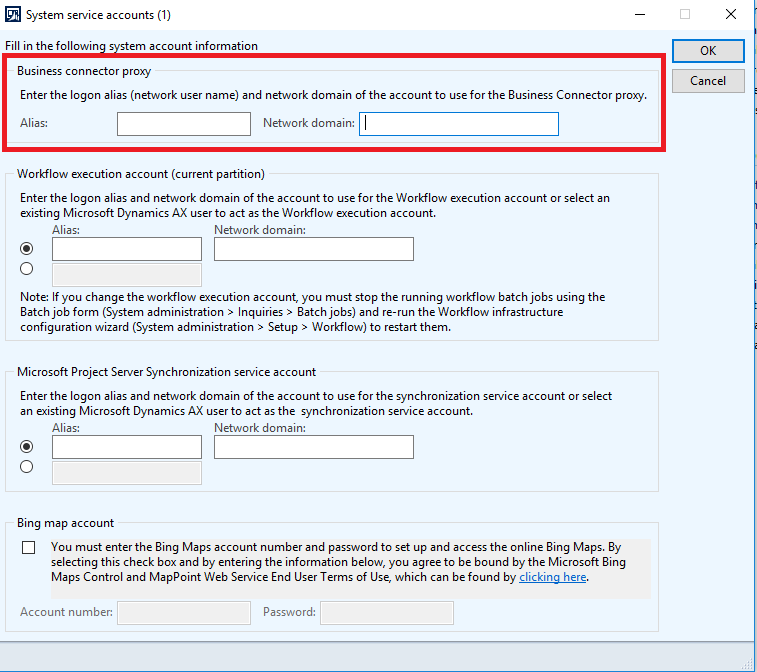
2. check your AX configuration.
both local client and business connector must have connected correct configuration with correct port.
and also try to refresh WCF services for both.
 |
Error _reportName cannot be null or empty.
if you encounter this kind of error

in this specific case it looks like an earlier full compile did not finish.
i would suggest you to first compile the class mentioned in the error message and see if it solves the problem.
- go to AOS.
- find classname mentioned in the error message.
- compile it.
Monday, 29 February 2016
"X++ debugging is not enabled for code running on Application Object Server" warning

this warning can be ignored. and continue to debugging.
Thursday, 19 November 2015
How to full build in ax 2012
go to bin folder in ax folder
type axbuild.exe xppcompileall /aos=01 /workers=5 in command prompt
you'll get screens like below image.
let in run until you get below image. sometimes you might get blank screen with only "***". just hold it. it will run itself.
1. open command prompt (run as admin)
2. go to bin folder in ax folder in the command prompt.
2. go to bin folder in ax folder in the command prompt.
4. you'll get screens like below

5. let in run until you get below image. sometimes you might get blank screen with only "***". just hold it. it will run itself.

Sunday, 15 November 2015
Allow RDC into computer.
Go to
Control Panel > System and Security > System
at remote tab, allow remote connection to this computer.

Control Panel > System and Security > System
at remote tab, allow remote connection to this computer.
Tuesday, 10 November 2015
index at queryrun
it is possible to use index hint in query object.
try :
queryBuildDataSource.addSortIndex(indexNum(MyTable, MyIndex));queryBuildDataSource.indexIsHint(true);
people use index hint in query is because to improve the performance we fetch the data by using Query object and in this query i can put Order by or group by options for sorting/grouping.
in the same way i can use index hint for particular datasource.
try :
queryBuildDataSource.addSortIndex(indexNum(MyTable, MyIndex));queryBuildDataSource.indexIsHint(true);
people use index hint in query is because to improve the performance we fetch the data by using Query object and in this query i can put Order by or group by options for sorting/grouping.
in the same way i can use index hint for particular datasource.
Thursday, 29 October 2015
Thursday, 15 October 2015
query not updated.
Hi,
Have you ever work with query in the class? and after do some changes to the query in the class, when you run it, the query is not updated?
Well, its because of the sysLastValue. It keep your query saved. So whenever you change the query, it still be using the old one, unless you delete the saved query at the sysLastValue.
If you realized, after you changed the query, when you debugged it, it does not go into your initQuery() method, but once you deleted the saved query, it will go into the initQuery() again, to get the new query to run. now! you'll have your new, fresh updated query run.
To delete the sysLastValue is, go to the aot:
AOT > System Documentation > Tables > SysLastValue
right click at the SysLastValue, go to the table browser, find your element name, and delete everything that is listed there related to your element. make sure you deleted the right one.
wallah! now you good to go! :)
Have you ever work with query in the class? and after do some changes to the query in the class, when you run it, the query is not updated?
Well, its because of the sysLastValue. It keep your query saved. So whenever you change the query, it still be using the old one, unless you delete the saved query at the sysLastValue.
If you realized, after you changed the query, when you debugged it, it does not go into your initQuery() method, but once you deleted the saved query, it will go into the initQuery() again, to get the new query to run. now! you'll have your new, fresh updated query run.
To delete the sysLastValue is, go to the aot:
AOT > System Documentation > Tables > SysLastValue
right click at the SysLastValue, go to the table browser, find your element name, and delete everything that is listed there related to your element. make sure you deleted the right one.
wallah! now you good to go! :)
Monday, 29 December 2014
error: dynamic property of the field list of query data source 'MyTable' has not been set
if you ever encounter this kind of error:
"The dynamic property of the field list of query data source 'MyTable' has not been set"

try this:
open query>DataSource>Field
Check property of filed it will have a property called "DYNAMIC PROPERTY" which is set to unspecified by default. Make it yes
Tuesday, 7 October 2014
Unable to preview SSRS reports from Visual Studio 2010
i have encountered this error when I try to edit SSRS report from my local VM. It seems not possible to work with SSRS report on these machines.

they way i solve this is by installing the Business Intelligence Development Studio feature of Microsoft SQL Server.
by using the ISO file from > http://www.microsoft.com/en-us/download/details.aspx?id=36843
choose SQL Server Data Tools

Wednesday, 20 August 2014
Enable Debug
You must enable debugging for each component as follows:
1. In the Development Workspace, on the Tools menu, click Options > Development > Debug,
and then select When Breakpoint in the Debug mode list.

2. From the AOS, open the Microsoft Dynamics AX Server Configuration Utility under Start
> Administrative Tools > Microsoft Dynamics AX 2012 Server Configuration. Create a new
configuration, if necessary, and then select the check box Enable Breakpoints to debug X++
code running on this server.
3. For Enterprise Portal code that uses the BCPROXY context to run interpreted X++ code, in the
Microsoft Dynamics AX Server Configuration Utility, create a new configuration, if necessary, and select the check box Enable Global Breakpoints.

1. In the Development Workspace, on the Tools menu, click Options > Development > Debug,
and then select When Breakpoint in the Debug mode list.
2. From the AOS, open the Microsoft Dynamics AX Server Configuration Utility under Start
> Administrative Tools > Microsoft Dynamics AX 2012 Server Configuration. Create a new
configuration, if necessary, and then select the check box Enable Breakpoints to debug X++
code running on this server.
3. For Enterprise Portal code that uses the BCPROXY context to run interpreted X++ code, in the
Microsoft Dynamics AX Server Configuration Utility, create a new configuration, if necessary, and select the check box Enable Global Breakpoints.
Tuesday, 19 August 2014
Set your date to first day of month
Code below is used when you want to set your date by default to 1st day of month, & the records are then filtered to only show invoices posted
after this date.
public void run()
{
//to set the date to default
FromDate.dateValue(systemDateGet() -dayofmth(systemDateGet()) + 1);
super();
}
after this date.
public void run()
{
//to set the date to default
FromDate.dateValue(systemDateGet() -dayofmth(systemDateGet()) + 1);
super();
}
Subscribe to:
Posts (Atom)